Invoice Holds
This page explains how invoice hold notifications work, which roles receive them, what actions are required, and how departments can resolve invoice holds to support timely supplier payments. Training resources referenced on this page are available here.
How invoice hold notifications work
The UCR Department Report for AP Invoices in Oracle Financials supports the efficient processing of invoice holds. Department users receive direct email notifications containing this report, listing specific invoice holds that require departmental action in order for Accounts Payable to complete payment.
Departments receive detailed and targeted notifications for invoices on hold, reducing general AP communications and focusing attention on invoices that require user action. Notifications include an Excel file that groups relevant invoices and lists required actions by hold type and by departmental role.
Automated email notifications are sent on Mondays, Wednesdays, and Fridays. Each notification reminds users of the steps needed to resolve the hold and expedite payment.
Who receives invoice hold notifications
Invoice hold notifications are routed according to the type of issue identified:
- Department Receivers noted on the requisition receive notifications for holds related to received quantity.
- Department Transactors receive notifications for allocation issues, maximum order issues, schedule amount holds, ordered quantity discrepancies, or price-related holds.
- Department Fiscal Approvers are copied on all notifications to maintain visibility into pending invoice issues.
This routing ensures that the individuals responsible for the specific hold type receive actionable information to resolve the hold.
Common invoice hold types
Common types of invoice holds sent to departments include:
- Quantity received holds
- Ordered quantity holds
- Price discrepancy holds
- Maximum order amount holds
- Schedule amount holds
- Allocation or account string issues
- Missing receipt holds for goods
- Matching discrepancies between PO, receipt, and invoice
Additional operational or supplier-related holds may appear depending on the transaction details.
Resolving invoice holds (department steps)
When a department receives an invoice hold notification, the steps to resolve it generally include:
- Reviewing the hold description in the Excel attachment
- Verifying the PO, receipt, or chart string information
- Updating the receipt, if needed, to reflect accurate quantities or delivery
- Confirming PO amounts or requesting a PO change through internal processes
- Coordinating with the Buyer for issues related to pricing or ordered quantities
- Updating allocations or correcting chart string errors
- Confirming completed services or deliverables with the supplier or end user
- Notifying AP once the required departmental action has been taken
Departments should act promptly on all holds to avoid payment delays to suppliers.
AP Communication Holds
An AP Communication Hold is applied when Accounts Payable requires additional information or clarification before an invoice can be processed. These holds indicate that AP is waiting for departmental review or confirmation. Departments may need to:
- Review the invoice image and related documentation
- Confirm quantities, pricing, supplier agreements, or funding sources
- Provide missing documentation or corrections
- Respond directly to AP with the requested information
- Coordinate with the supplier if additional clarity is needed
Once the department provides the necessary response, AP will evaluate and remove the hold so the invoice can continue through processing.
Sample notification
Below is an example of the type of invoice hold notification departments receive. The email includes an Excel attachment listing the invoices on hold, the hold type, and the steps required to address each issue.
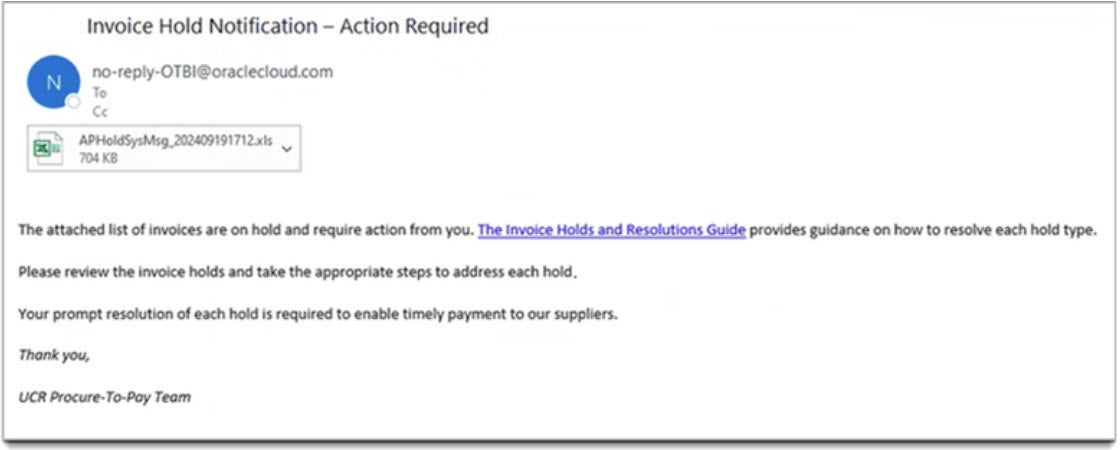
If you have any questions about specific invoice holds, please contact the designated AP processor listed in the Contact Tree.
Frequently Asked Questions
Q: How do I know which holds I’m responsible for?
A: Use the role-specific columns in the Excel attachment and refer to the hold descriptions in the Invoice Holds and Resolutions Guide. Receivers, Transactors, Buyers, Payables Specialists, and EMF each have clearly defined responsibilities.
Q: Where can I see all invoice holds for my department?
A: Run the UCR Department Report for AP Invoices in Oracle Financials, which includes filters for invoice date, owning department, payables specialist, invoice source, invoice number, supplier number, and supplier name.
Q: What should I do if I don’t understand a particular hold?
A: First, look up the hold in the Invoice Holds and Resolutions Guide. If you still have questions, contact the appropriate support person listed below.